

Track coffee machine inventory, service history, and technicians in one app. Simplify café maintenance with Moqa’s all-in-one coffee equipment manager.

Imagine this scene: you manage several cafés (or you service coffee machines for a living) and you walk into a back office – spreadsheets everywhere, sticky notes on machines saying “service due,” handwritten logs in binders, and a technician driving out without a clear view of the machine’s history or what parts they’ll need. Not ideal.
Now imagine a different scene: one mobile or web app shows every coffee machine you manage (where it is, what model, when it was last serviced), the full service history (who did what, when, with what parts), and a live view of your field jobs – what’s assigned, what’s in progress, and what’s completed. That’s the kind of digital clarity that turns coffee-equipment chaos into smoother operations.
In this blog, we’ll walk through how you can track coffee machine inventory, service history, and technicians in one app, why that matters, the features to look for (especially for the beverage industry), and how to implement it without stress. Grab your espresso – let’s dive in.
Let’s unpack what we mean by “all-in-one” in real terms for a coffee business – whether that’s a multi-site café chain, a coffee equipment rental outfit, or a service company handling espresso machines for dozens of customers.
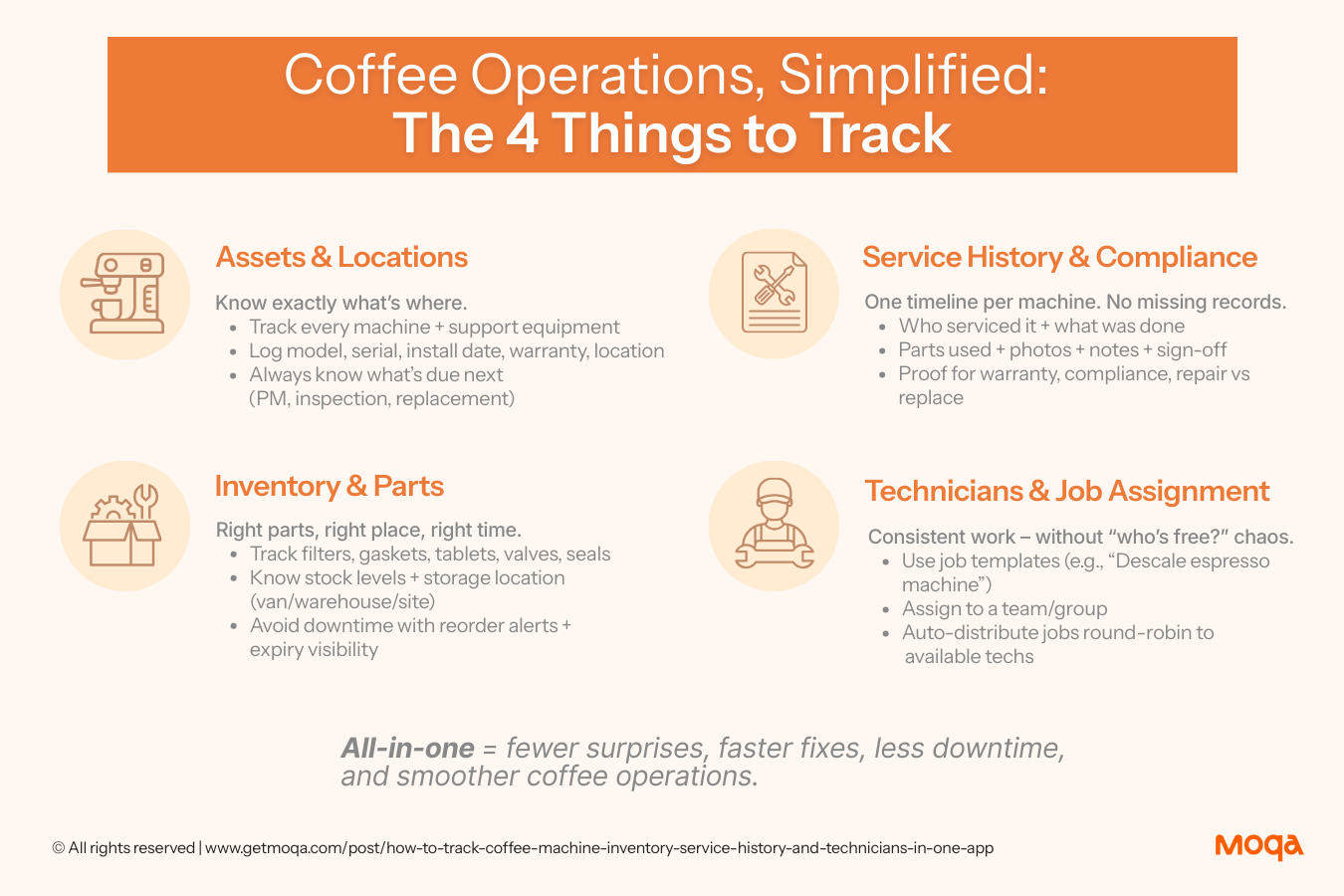
Every machine (espresso machine, grinder, water filter, hot-water tower, cooler, etc) can be tracked with details like model, serial number, install date, warranty info, and exact location (which café, which floor, which room). It’s no longer “we think machine #12 is in Café A,” but:
“Serial ABC123 is in Café A, installed 14 Sep 2024, next PM due 15 Dec 2026.”
.png)
One app, one timeline per machine: who worked on it, what job they completed, what parts they used (gaskets, valves, cleaning tablets), photos, sign-off, and notes. Why? Because if you want to claim warranty, prove compliance, or decide “repair vs replace,” you need a reliable log. Industry experts agree that detailed work order records and parts usage help extend machine life and protect coffee quality.
Machines need parts – filters, seals, gaskets, cleaning tablets, valves, you name it. Knowing what’s in stock, where it’s stored (van, warehouse, café back room), when to reorder, and when consumables expire helps you avoid downtime. In coffee operations, inventory waste and traceability matter.
You’ve got techs in the field, and the work is repetitive: descaling, preventive checks, repairs, installs.
A scalable way to manage this is template-based jobs:
That means the work gets done consistently, without relying on manual “who’s free” decisions every time.
Because we’re talking about coffee equipment (not generic industrial machinery), there are some unique maintenance needs worth calling out.
Your espresso machine isn’t “fire and forget”. Daily and weekly routines – like cleaning group heads, purging steam wands after milk drinks, emptying drip trays, and flushing at end of day – keep coffee quality high and prevent build-up of coffee oils and milk residue.
Beyond daily routines, you’ll schedule preventive maintenance (PM) by time (monthly, semi-annual) or by meter (brew cycles, volume of water processed). For example: after 20,000 brew cycles, replace gaskets; after 12 months, inspect the solenoid valve. Maintenance charts for espresso machines back up this structured approach.
The real magic happens when you convert those maintenance checklists into recurring tasks in your app. Instead of “Monthly – replace group head screen” living in someone’s head, it becomes:
No sticky notes. No “I thought someone did it.”
If you’re evaluating a tool, here’s the practical checklist of features that actually matter for beverage equipment operations.
Scan a label on the machine and instantly pull up the full record: install date, service history, warranty status, notes, and next PM due. This is especially valuable for technicians, because it gives them context fast before they start work.
A built-in scheduler where you can define maintenance rules like: “every 30 days or every 10,000 cycles, whichever comes first.” For coffee equipment, recurring PM needs to be predictable and easy to track.
Instead of complicated dispatch rules, you want a repeatable workflow:
This helps you scale without turning dispatching into its own full-time job.
This is a big one for coffee equipment. You should be able to:
Example: If a tech flags “slow steam pressure” during inspection, the system can automatically generate a follow-up job (eg “inspect steam valve + replace gasket”) and assign it to the right team.
Track stock levels for filters, gaskets, cleaning tablets, valves, and more – by location (warehouse, van, site). Set reorder alerts so you don’t end up with “sorry we’re out of that gasket, come back next week.”
One timeline per machine showing everything: install date → service work → parts changed → tech notes → next scheduled PM. Photos and sign-offs included. This matters for warranty claims, audits, and deciding whether it’s time to retire an asset.
For many coffee equipment operations, what you need isn’t a customer portal – it’s fast, clean documentation. Once a job is done, you should be able to generate and send a completion form / proof-of-work PDF instantly to the customer or site contact.
You want to be proactively notified when important events happen. A good system supports custom alerts like:
Because the cherry on top: you want to track numbers like mean time to repair (MTTR), first-time fix rate, parts consumption per machine, cost per asset, downtime per site, and more. That’s how you show ROI on your maintenance program.
.png)
Think of this like a recipe for the café ops team – simple steps, repeatable results.
Export whatever list you have (spreadsheets, database, etc) of all machines: name, model, serial, install date, location, warranty end date, last service. Import into the app. Then print and affix QR/barcode labels on each machine so scanning = instant machine history.
Start with daily/weekly/monthly/annual routines and build them into the app as templates. Attach checklists so technicians follow the same steps every time. This is how you move from “tribal knowledge” to consistent execution.
Set up your consumables inventory: filters, gaskets, solenoids, cleaning tablets, valves. Set minimum stock levels, reorder points, and track where parts are stored (warehouse vs van vs site). You should also track expirations for consumables.
Instead of complex skill-routing, keep the workflow scalable:
This is especially effective for standardized work like descaling, PM checks or routine repairs.
Keep training simple: scan asset → open job → follow checklist → log parts used → upload photos → close job → generate completion form PDF. When the workflow is easy, adoption is faster.
Once live, track KPIs like PM completion rate, repeat issues by model/part, first-time fix rate, downtime per site, and parts stockouts. Review monthly and refine checklists, templates, and inventory levels as you go.
Say you operate 40 cafés across a city. Each has a mix of machines. With software like Moqa, you track every machine and build predictable PM through templates. You get reminders before work becomes overdue, and you can spot repeat issues by model so you’re not fixing the same failure every month.
You deploy machines and also service them. Your technicians scan an asset to instantly view service history, complete work using standard checklists, log parts used, and send proof-of-work PDFs after each job. Over time, you build a reliable record that helps with warranty, compliance, and service quality.
Smaller scale but high-value equipment: grinders, QC machines, espresso machines used for demos and training. You track calibrations, burr replacement, and preventive checks in one system – so equipment stays consistent for training, tasting, and customer experiences.
Digital tools don’t exist in a vacuum – you may connect the system with other tools.
(And if you’re considering IoT/telemetry: treat it as a future enhancement – not a requirement for running strong coffee equipment ops day to day.)
You’ll want to show results (and yes, impress the café owner or ops lead). Key metrics include:
Improvement in these metrics = better coffee performance + lower costs + happier customers.
When everything lives in one app – your equipment inventory, service history, technician workflows, and analytics – you stop firefighting and start fine-tuning. You can see what’s working, what’s wearing out, and what’s due next without daily chaos.
That’s what Moqa is built for. It’s not a one-size-fits-all field service tool – it’s designed for beverage equipment operations. Whether you manage a fleet of espresso machines or handle service work for café chains, Moqa gives you the control that keeps coffee consistent, machines humming, and customers smiling.
Want to see Moqa in action? Book a free demo today, or simply reach out to learn more.
Here’s the takeaway: when your machines, people, and data finally speak the same language, maintenance stops feeling like a daily scramble – and starts feeling like mastery.
Use an asset management/field service app where each machine has its own record. With QR/barcode scanning, technicians can instantly pull up installation date, service log, parts used, photos, and next service due – much easier than spreadsheets.
It depends on usage and water quality. In general: daily cleaning (flush group heads, purge steam wands), weekly deeper cleaning, and monthly/semi-annual tasks (gasket checks, valve inspections), plus an annual major service.
Use job templates and assign them to a team/group. Then distribute work round-robin so the system assigns tasks to available team members without manual dispatching every time.
Set each item up as an inventory part in your system, assign reorder points, track stock by location (warehouse/van/site), and log usage per job. This reduces stockouts and repeat technician visits.
Not necessarily. Strong asset records, checklists, scheduling, service history, inventory tracking, and alerts will get you most of the value. IoT can be a future add-on if your operation has the scale and equipment support for it.